
The Treasury books,
kept by the system.
Accountra keeps the books of a ministry, agency, tertiary institution or local government council. It follows the Treasury payment cycle from the moment a voucher is raised to the moment cash leaves the bank, enforces the budget along the way, and produces the registers, ledgers and IPSAS cash-basis statements that go with it.
- check_circleBuilt around Nigerian Treasury practice
- check_circleBudget enforced at the point of entry
- check_circleIPSAS cash-basis statements
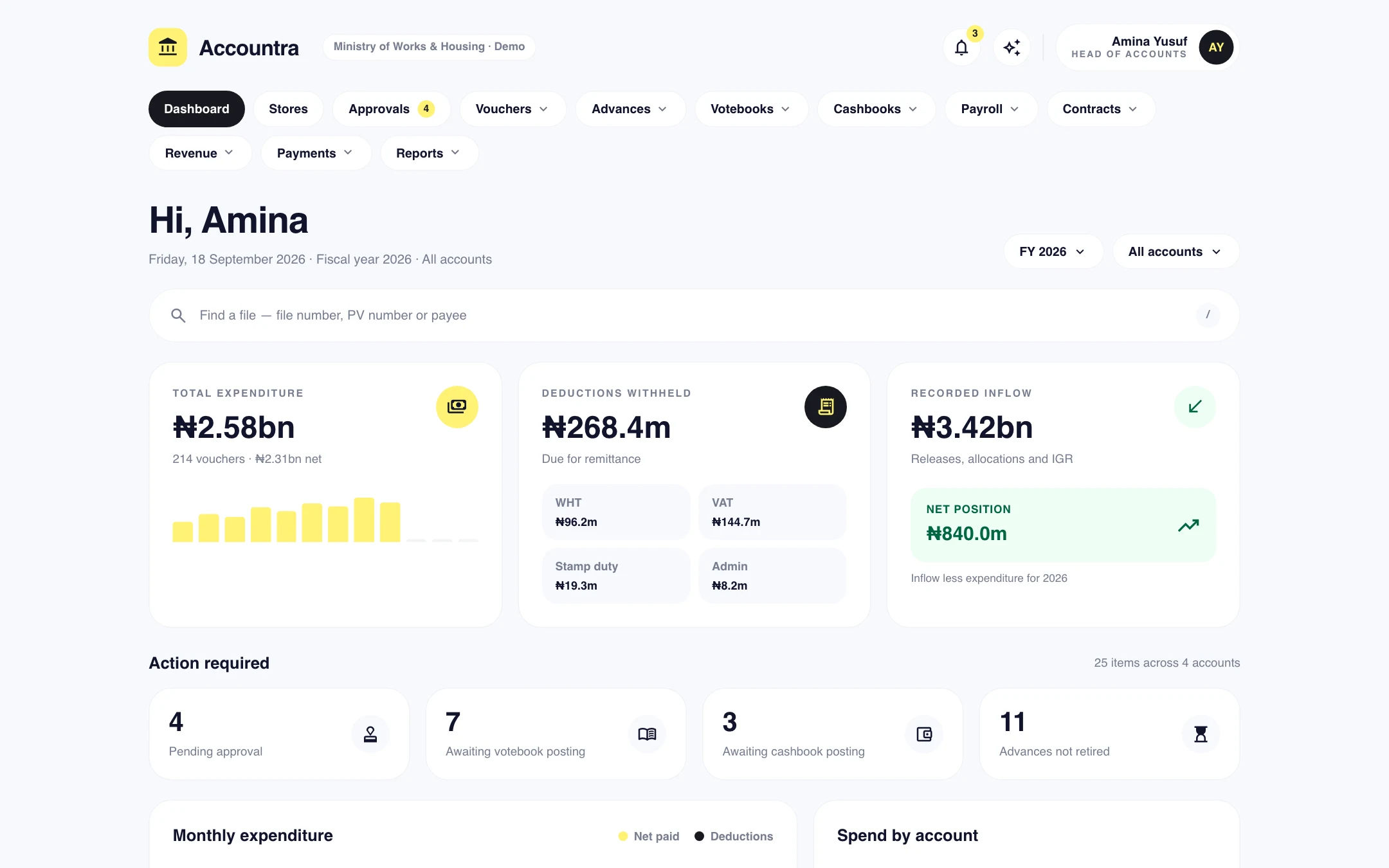
Screens on this page show demonstration data.
A paper votebook cannot refuse an overspend.
The Treasury books were designed for paper, and paper records what happened after it happened. By the time the votebook shows a vote is exhausted, the voucher has been raised, approved and paid. Accountra checks the budget before the voucher exists.
- close Vouchers raised against votes that are already exhausted
- close VAT, withholding tax and stamp duty worked out by hand
- close A cashbook, votebook and ledger that never quite agree
- close Deductions remitted late because nobody totalled them
- close Month-end reports rebuilt from several books each time
- check A voucher that would exceed its budget line is refused
- check Deductions computed as the voucher is typed, each with its own breakdown voucher
- check One cashbook entry posts the general ledger automatically
- check Outstanding deductions gathered into schedules ready to remit
- check Trial balance and statements available on any day of the year
The full payment cycle, in one set of books.
Also included: revenue receipts, imprest, deposits, contracts and commitments, grants, funds and cost centres, an audit trail, nightly backups, bulk import and a read-only API.
Treasury payment vouchers
Raise T27 contractor vouchers, TF1 payment vouchers and staff advances. PV numbers are generated, amounts are put into words, and everything prints to PDF.
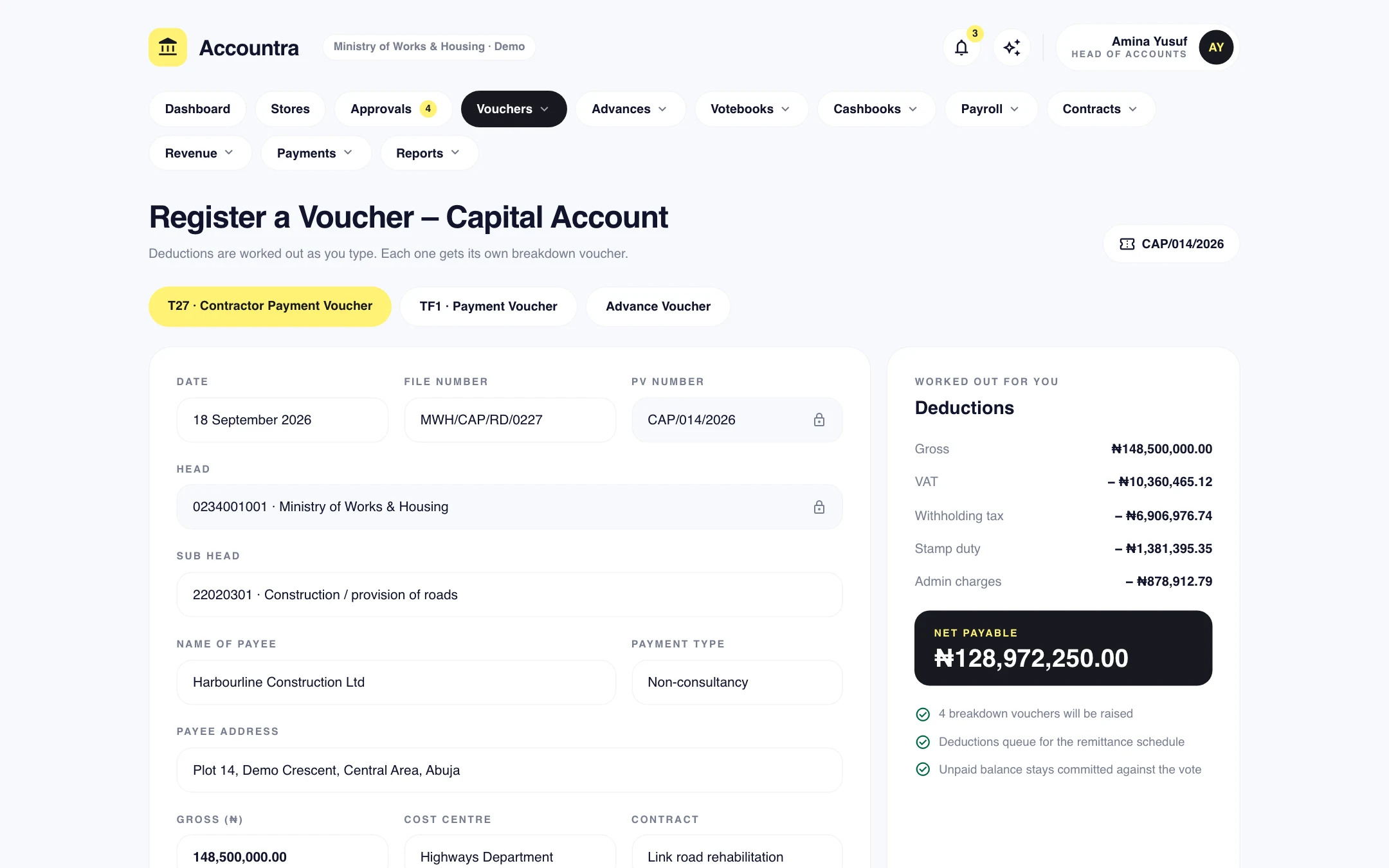
Deductions worked out for you
VAT, withholding tax, stamp duty and admin charges are computed on entry, then gathered into schedules to remit with the revenue reference.
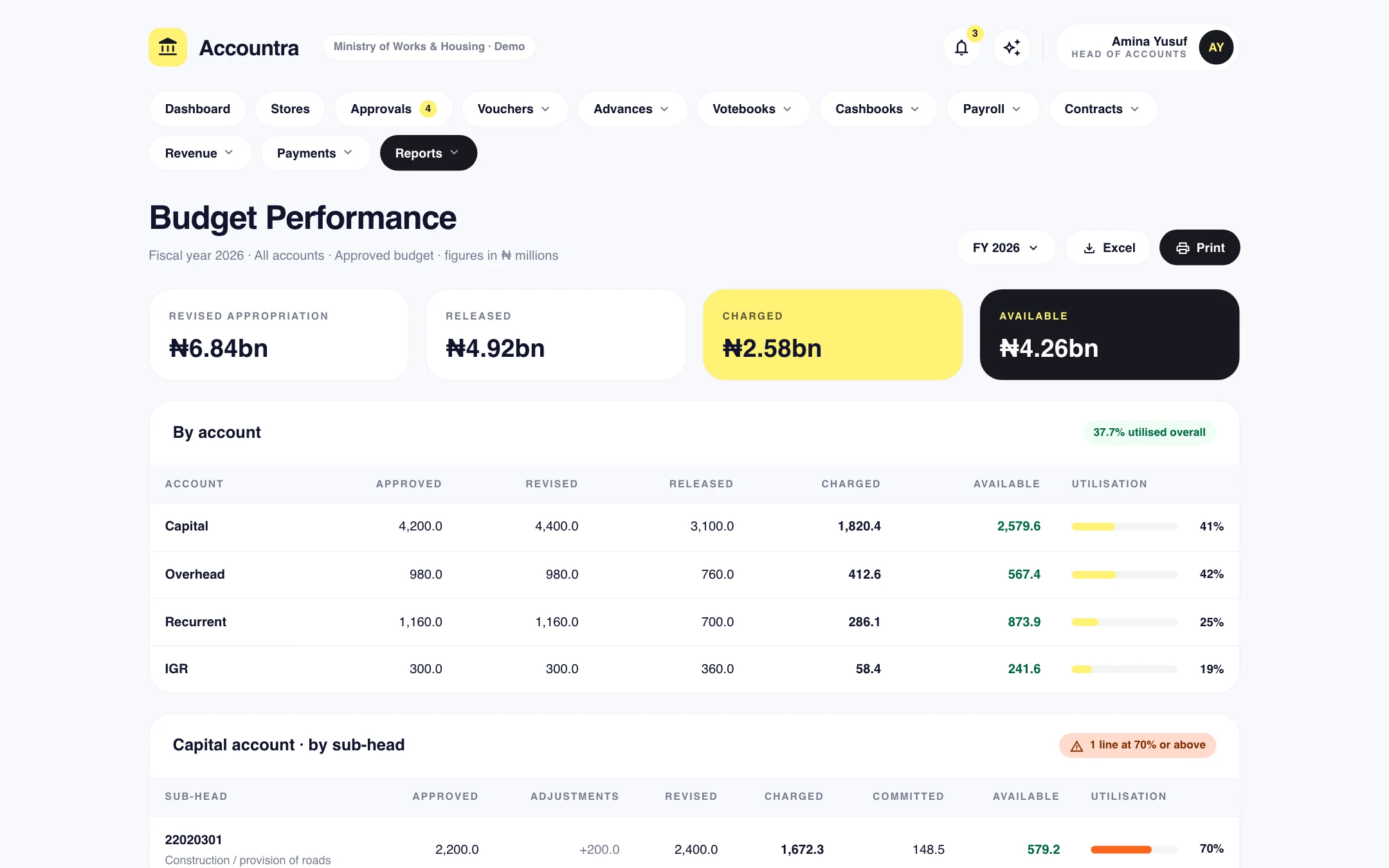
Hard budget control
One budget per year by account and sub-head, with supplementary appropriations, virements and warrants. A voucher that exceeds its line is refused.
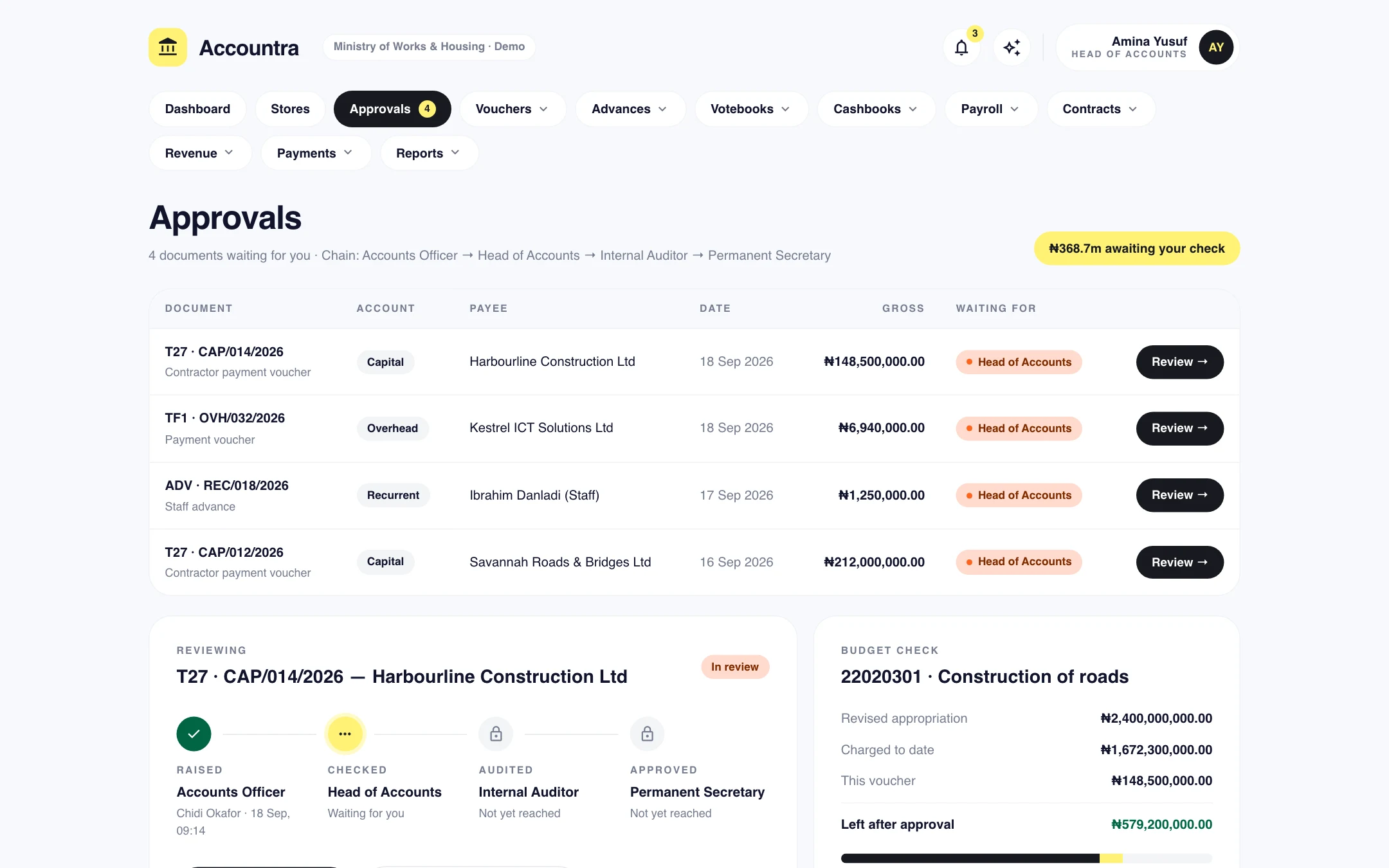
Multi-stage approvals
Checked, audited, approved, in that order. Titles follow your organisation, each stage can carry an amount limit, and a returned document comes back with a comment.
Votebook and cashbook
A vote ledger for each account and year, and the Treasury Cashbook with receipts and payments sides, brought forward each month.
A ledger that posts itself
Every cashbook line posts a balanced cash-basis journal. The trial balance shows at a glance whether the books agree with the cashbook.
Bank reconciliation
Import the bank statement from CSV or Excel. Lines are matched to the cashbook automatically, and the month-end reconciliation statement prints.
IPSAS financial statements
The Statement of Receipts and Payments and the Statement of Assets and Liabilities, by account or by fund, exported to Excel.
Payroll, stores and assets
Payroll with PAYE, pension, NHF and NHIS for organisations not on IPPIS, store receipt and issue vouchers, and a tagged fixed asset register.
See it at work.
Checked, audited and approved, in that order
Every voucher follows the chain your organisation actually uses, with the right title at each stage. The approver sees the document, its supporting files and exactly what it does to the budget line before deciding.
- check_circleTitles follow your organisation, from Bursar to Permanent Secretary
- check_circleAmount limits by role at each stage
- check_circleReturn a document with a comment instead of rejecting it outright
Deductions worked out as you type
Enter the gross and the payment type and the system does the rest: VAT, withholding tax, stamp duty and admin charges, the net payable and the amount in words. Each deduction gets its own breakdown voucher.
- check_circleHead and sub-head from the National Chart of Accounts
- check_circleBudget line checked before the voucher is saved
- check_circleDeductions queued for the remittance schedule
Know what is left on every line, today
Approved, revised, released, charged, committed and available, for every account and every sub-head. The report is drawn from the same entries as the votebook, so it is never a month behind.
- check_circleSupplementary appropriations and virements shown
- check_circleCommitments from contracts counted against the line
- check_circlePrint, or export to Excel
From release to report, one entry at a time.
-
01
Record the release
Record the allocation or release. The votebook gets its balance and the month's cashbook opens.
-
02
Raise the voucher
The budget line is checked as the voucher is raised, and deductions are worked out on entry.
-
03
Approve it
The voucher is checked, audited and approved by the right officers, each within their limit.
-
04
Pay, post and report
Pay by mandate or cheque. The cashbook entry posts the ledger, and the statements are already up to date.
One system, every role.
Each person sees exactly what their job needs, and nothing they should not. Access is set by role, and every action is attributed to a name.
Accounts officers
Raise vouchers and advances, record retirements and attach supporting documents.
Heads of accounts
Check vouchers, manage the budget and remittances, and reconcile the bank. Bursar or Treasurer where that is the title.
Internal auditors
Audit every voucher before payment, with the audit trail and attachments to hand.
Approving officers
Give final approval within your limit, and see the position of every account from the dashboard.
Not just a licence. A working system.
Configured to you
Your structure, your approval chains, your branding, set up before anyone logs in.
Data brought across
Existing records migrated from spreadsheets, paper registers or the system you are leaving.
People trained
Hands-on sessions for users and administrators, with guides they can return to.
Supported after launch
A named contact, a response time in writing, and updates as your needs change.
The outcomes.
- check_circleSpending that cannot exceed the budget line
- check_circleBooks that agree with each other every day
- check_circleDeductions remitted on schedule, with references
- check_circleStatements ready for audit without a rebuild
Before you ask.
Want to see it with your own data? Ask for a demo and we will walk you through it.
Does it follow Nigerian Treasury practice? add
Yes. It uses the T27 and TF1 voucher forms, the votebook and the Treasury Cashbook, loads the National Chart of Accounts for the federal, state or local tier, and produces IPSAS cash-basis statements.
We are a university or a council, not a ministry. Will it fit? add
Yes. It is set up for one of four kinds of organisation, and the titles, forms and approval chain follow that choice: Bursar and Vice-Chancellor for an institution, Treasurer and Chairman for a council.
Can we bring our existing records across? add
Yes. Contractors, staff, opening balances, assets, stock and paid-voucher history can be imported from spreadsheets. Every import is previewed before anything is saved.
We are on IPPIS and GIFMIS. Does that change anything? add
It does, and the system accounts for it. Payroll is for organisations that are not on IPPIS. With GIFMIS switched on, payments are batched into mandates with an e-payment schedule. Without it, there is a cheque register.
Can other systems read our figures? add
Yes. A read-only API covers vouchers, the cashbook, the trial balance, budget performance and more, using tokens you issue and can revoke.
Bring one month of vouchers and watch the books keep themselves.
We will walk you through the product using a scenario from your own organisation, answer the hard questions, and tell you honestly whether it fits.