
Every memo numbered, routed
and accounted for.
E-Memo replaces paper memos inside ministries, agencies and institutions. Staff draft on the official letterhead, route through the proper chain of offices, and every minute, forward and read is recorded. Nothing waits unseen in a file tray, and nothing leaves the building untraced.
- check_circleRuns in the browser, nothing to install
- check_circleYour crest, letterhead and structure
- check_circleEvery action recorded against a name
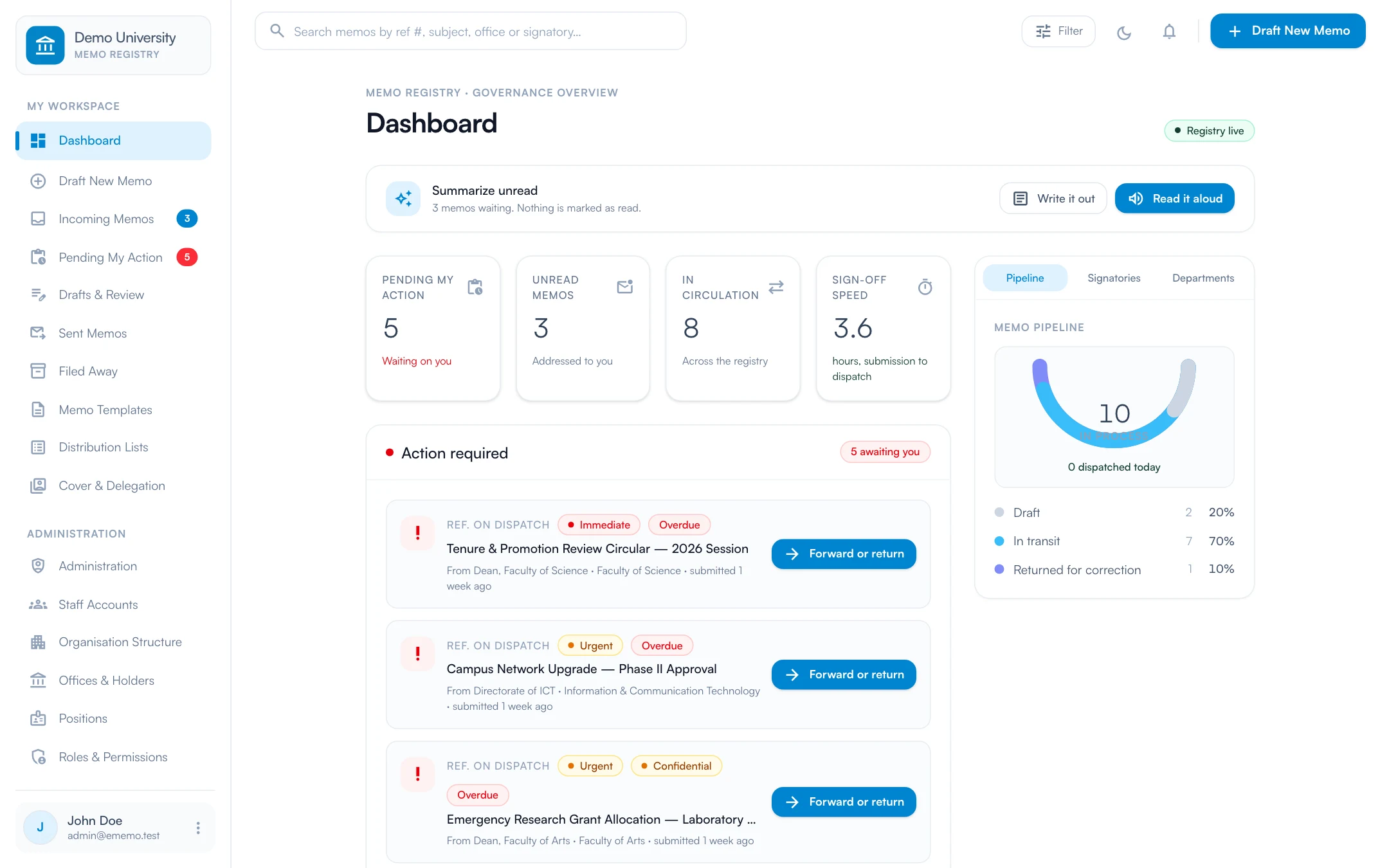
Screens on this page show demonstration data.
Paper memos are slow, and nobody can prove where they went.
A memo that travels by hand depends on who is at their desk. It waits, it gets lost, and when it finally arrives nobody can show who held it or what they wrote on it. E-Memo keeps the formality of the registry and removes the waiting.
- close Memos waiting in file trays while an officer is away
- close No way to see which office a memo is sitting with
- close Minutes written in margins and lost with the file
- close Unnumbered correspondence that cannot be found later
- close Confidential memos photocopied with no trace of who did it
- check Each office on the chain is notified the moment it is their turn
- check A routing chain that shows who has it now and who is next
- check Every minute kept in one thread, in order, with a name and time
- check A reference number assigned at dispatch and never reused
- check A personal tracking code watermarked on every copy a reader opens
The whole registry, without the file trays.
Also included: memo templates with self-filling placeholders, distribution lists, cover and delegation for officers on leave, read receipts, and notifications by email and in the portal.
Routing through the proper chain
Set the offices a memo must pass through. Each one acts strictly in order, forwarding it with a minute or returning it with a reason.
Automatic reference numbers
A number is assigned at dispatch from your prefix, the office code, the year and a counter. Numbers are locked and never reused.
Offices, not just people
An office is separate from whoever holds it. Appoint substantive or acting holders, and the office mailbox and history pass to the successor.
Minuting on the record
Comments, forwards and return reasons are merged into one chronological thread on the memo, each with a name and a time.
Circulars addressed by rule
Send to everyone, to one part of the organisation and everything under it, to a grade-level range, or to a saved distribution list.
Signatures and letterhead
Sign on a pad or upload a signature. It is placed on the memo when you send, and the memo prints on your A4 letterhead.
Leak protection
Every reader has a personal tracking code, watermarked across each memo they open or print. Secret memos need a password and cannot be printed.
AI summary of unread memos
One click gives a digest of what is waiting, written out or read aloud. Confidential and Secret memos are never sent to the AI, and it can be switched off.
An audit trail that cannot be edited
An append-only record of what was done in the portal and by whom, searchable by action, person and date.
See it at work.
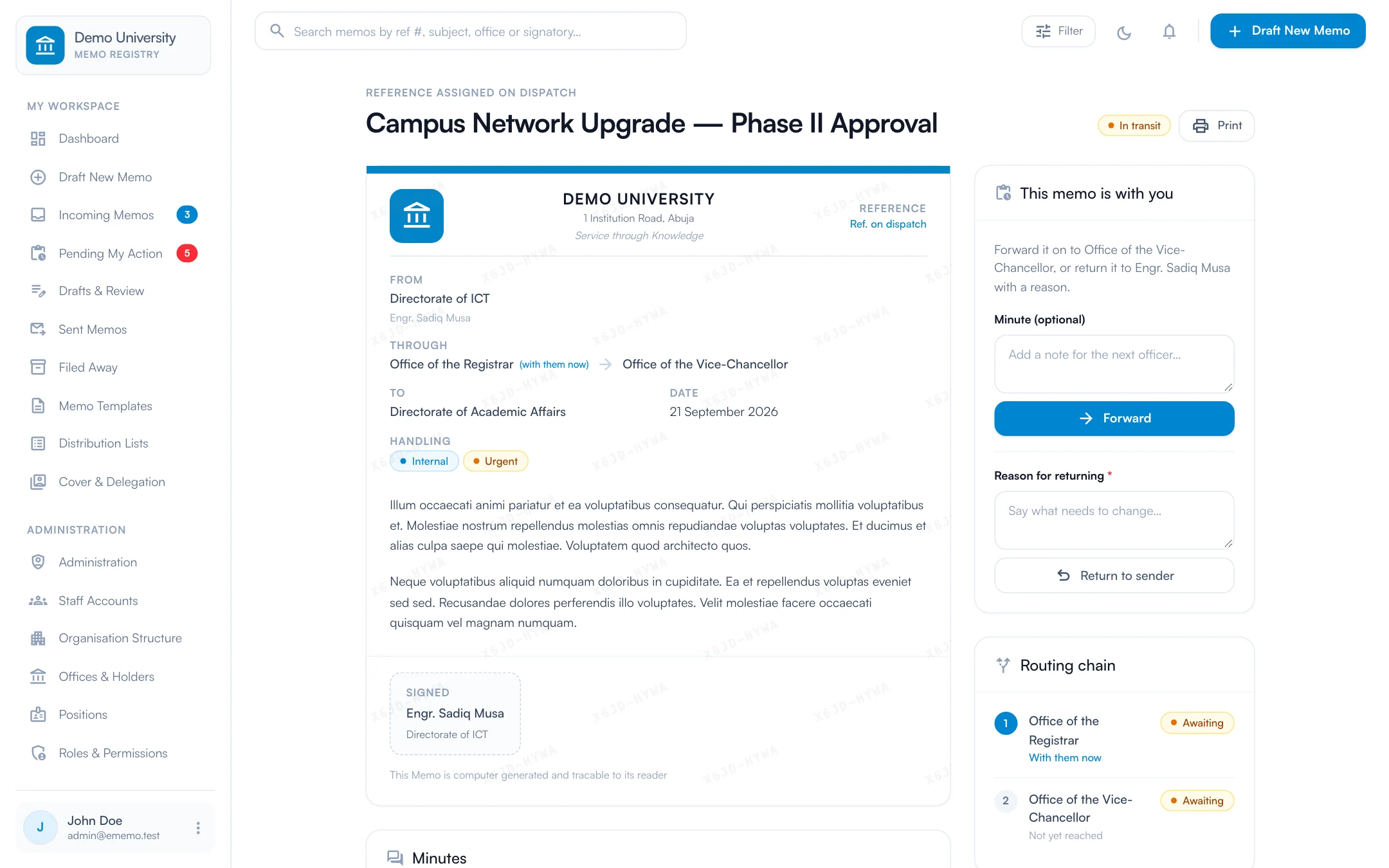
The memo, its chain and its trail on one page
Open a memo and everything about it is there: the memo on its letterhead, the offices it must pass through, who has read it and every minute written on it. If it is with you, you forward it or return it without leaving the page.
- check_circleLetterhead, signature block and attachments
- check_circleForward with a minute, or return with a reason
- check_circleRouting chain and read receipts alongside
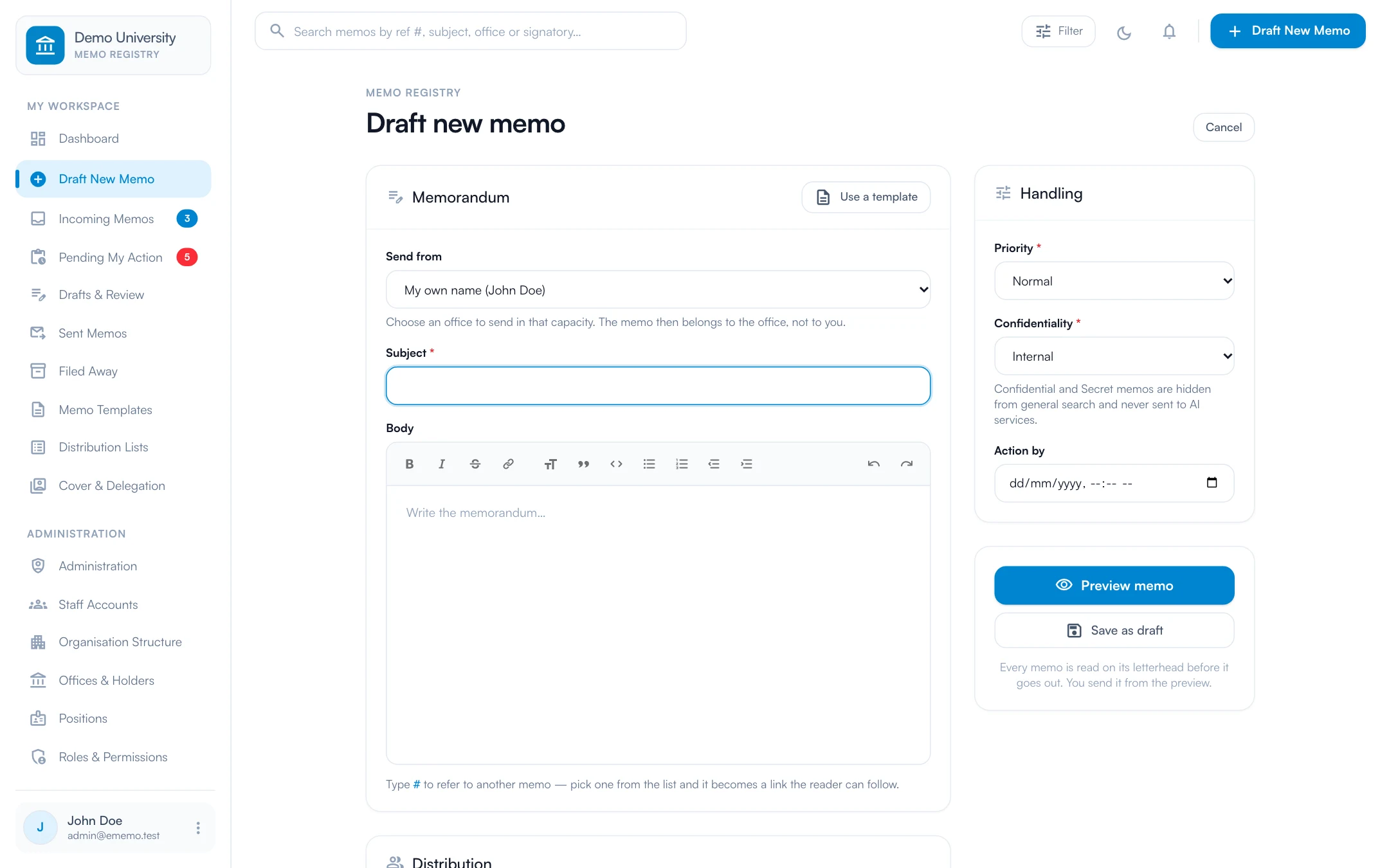
Draft in your own name, or in the name of your office
Write the memo in a proper editor, choose who it goes to and through, and set how it must be handled. Send as yourself or in the capacity of an office you hold, and preview it on the letterhead before it goes anywhere.
- check_circleInternal memo, external letter or circular
- check_circlePriority and confidentiality set per memo
- check_circleStart from a template, and link other memos with #
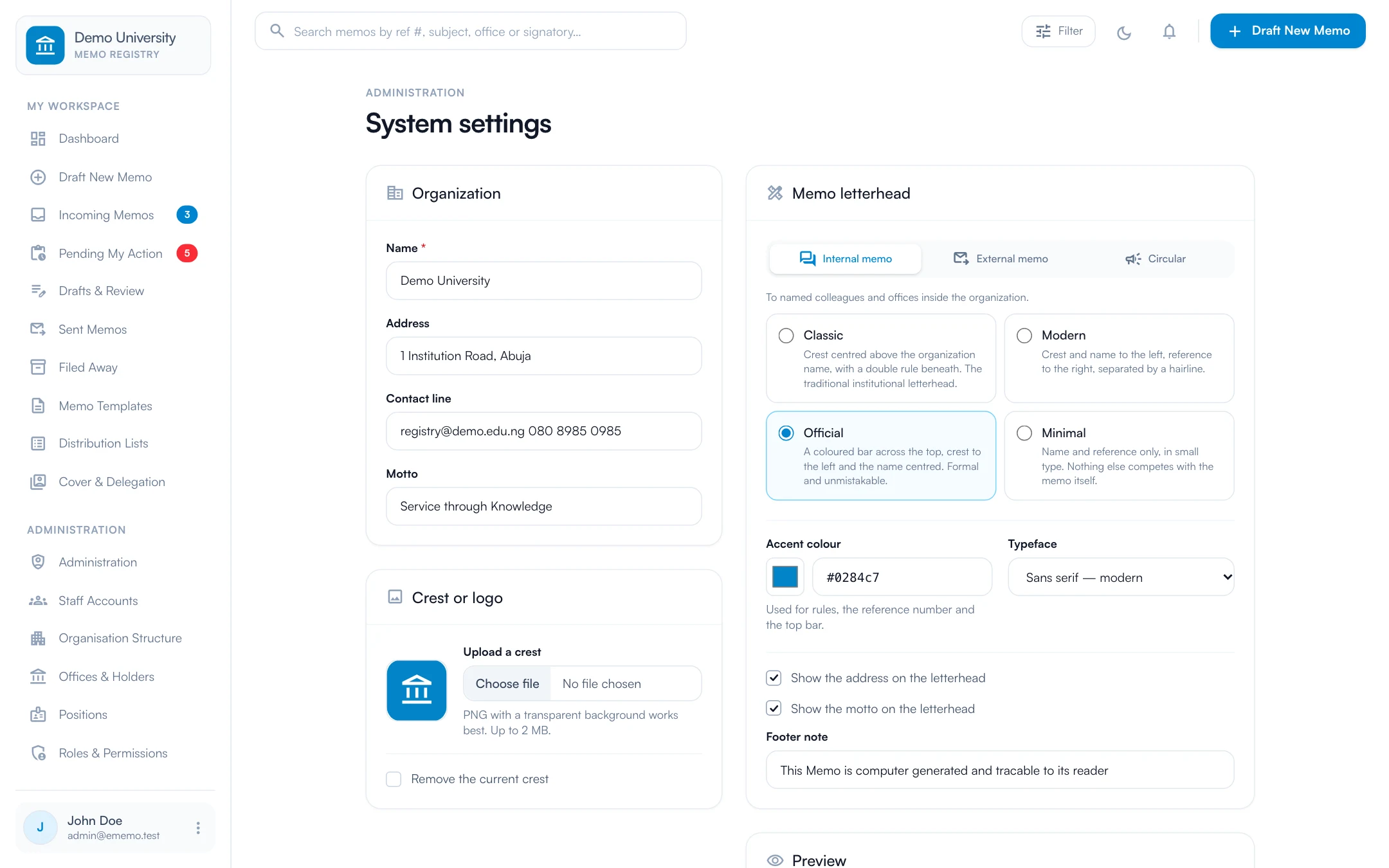
Your crest, your letterhead, your rules
Upload your crest, set your name, address and motto, and choose a letterhead design for each kind of memo. A live preview shows the real sheet as you change it, so the first memo sent already looks official.
- check_circleFour designs: Classic, Modern, Official and Minimal
- check_circleAccent colour, typeface and footer note
- check_circleDifferent letterheads for memos, letters and circulars
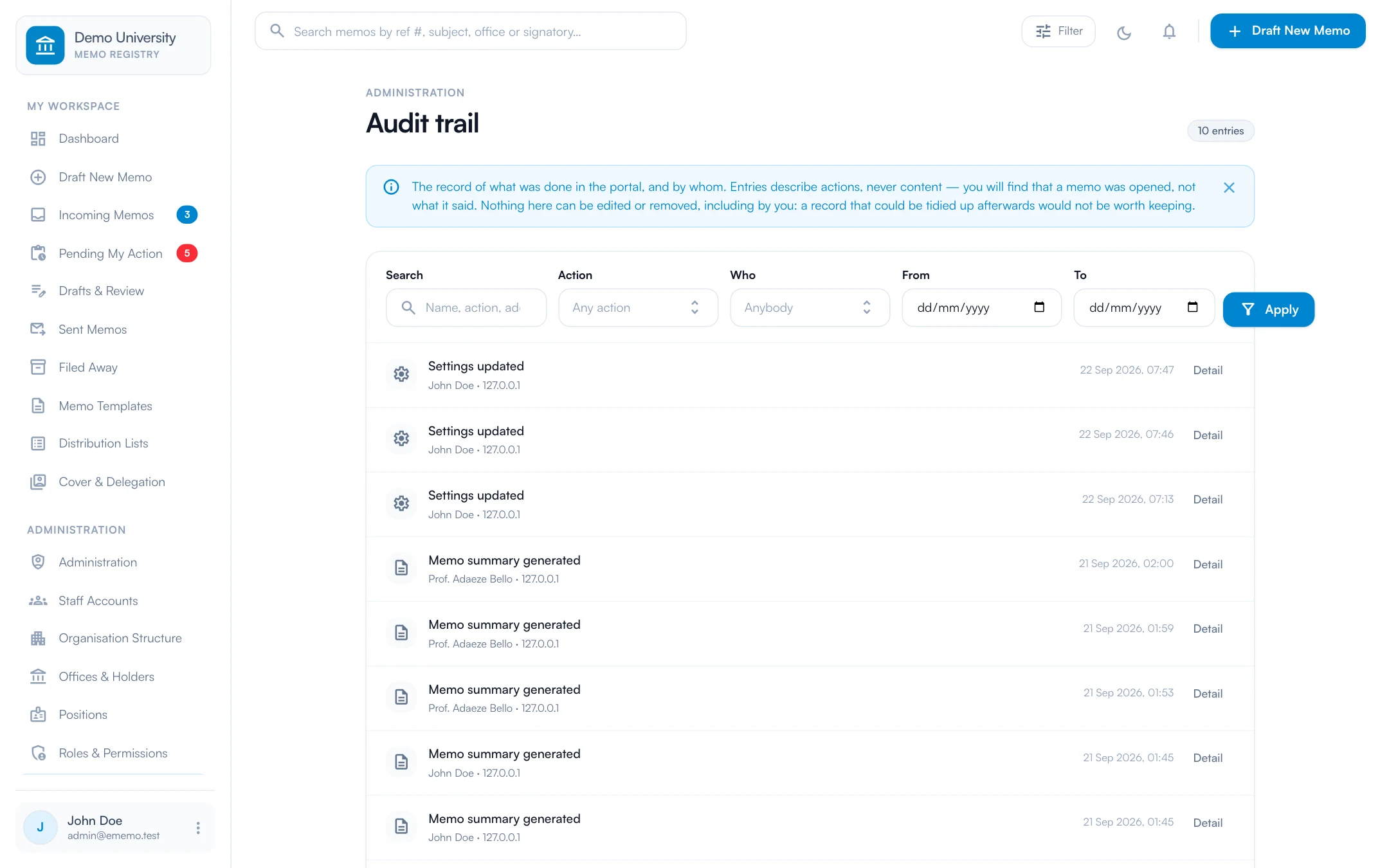
A record nobody can tidy up afterwards
Every consequential action is written to a log that cannot be edited or removed, by anyone. It records that a memo was opened, not what it said, so the trail is safe to show an auditor.
- check_circleFilter by action, person and date
- check_circleViews, prints and attachment opens all recorded
- check_circleRead-only, even for administrators
From draft to file, on the record.
-
01
Draft
Compose on the letterhead, from a template if you like, and preview the sheet before it goes anywhere.
-
02
Route
Each office on the chain forwards it with a minute or returns it with a reason, strictly in order.
-
03
Dispatch
The last forward dispatches the memo. A reference number is assigned and every addressee is notified.
-
04
Read, minute, file
Recipients read it with a receipt recorded, minute it, print it on letterhead and file it away.
One system, every role.
Each person sees exactly what their job needs, and nothing they should not. Access is set by role, and every action is attributed to a name.
Staff
Draft, receive, minute, forward and return memos, with templates and lists to speed up the routine ones.
Registry
Draft and dispatch on behalf of officers, then file and track correspondence across the organisation.
Office holders
Act in the name of the office you hold, substantive or acting. Authority comes from the office, not the login.
Administrators
Manage staff accounts, the organisation structure, offices and holders, roles, and the letterhead.
Not just a licence. A working system.
Configured to you
Your structure, your approval chains, your branding, set up before anyone logs in.
Data brought across
Existing records migrated from spreadsheets, paper registers or the system you are leaving.
People trained
Hands-on sessions for users and administrators, with guides they can return to.
Supported after launch
A named contact, a response time in writing, and updates as your needs change.
The outcomes.
- check_circleA numbered, searchable record of every memo
- check_circleA visible chain showing who has it now
- check_circleConfidential memos that stay confidential
- check_circleOffice history that survives a change of holder
Before you ask.
Want to see it with your own data? Ask for a demo and we will walk you through it.
Can it follow our own structure and titles? add
Yes. The organisation tree can be any depth, with levels you name yourself, whether that is department, division and unit or faculty and department. Offices have their own codes and reporting lines.
What happens when an officer is on leave or is replaced? add
An officer can arrange cover for a date range, and actions then show as one person acting for another. When a holder changes, the office mailbox and its history pass to the successor.
How are confidential memos protected? add
Each memo carries a handling level. Confidential and Secret memos are left out of general search and are never sent to the AI. Secret memos need a password to open, cannot be printed, and every copy carries the reader's tracking code.
How do we get our staff onto it? add
Staff are added one at a time or uploaded from a spreadsheet. Each receives an email with a single-use link to set a password, and is guided to add a photo and signature at first sign-in.
Is the AI summary optional? add
Yes. It can be switched off in settings for the whole organisation, and even when it is on, Confidential and Secret memos are never included.
See a memo travel from desk to desk in under a minute.
We will walk you through the product using a scenario from your own organisation, answer the hard questions, and tell you honestly whether it fits.